
Miscellaneous
The Misc tab consolidates mission-wide settings: date/time, navigation aids, bullseye, fuel limits, TOLD data, weather, notes, and watermark configuration.
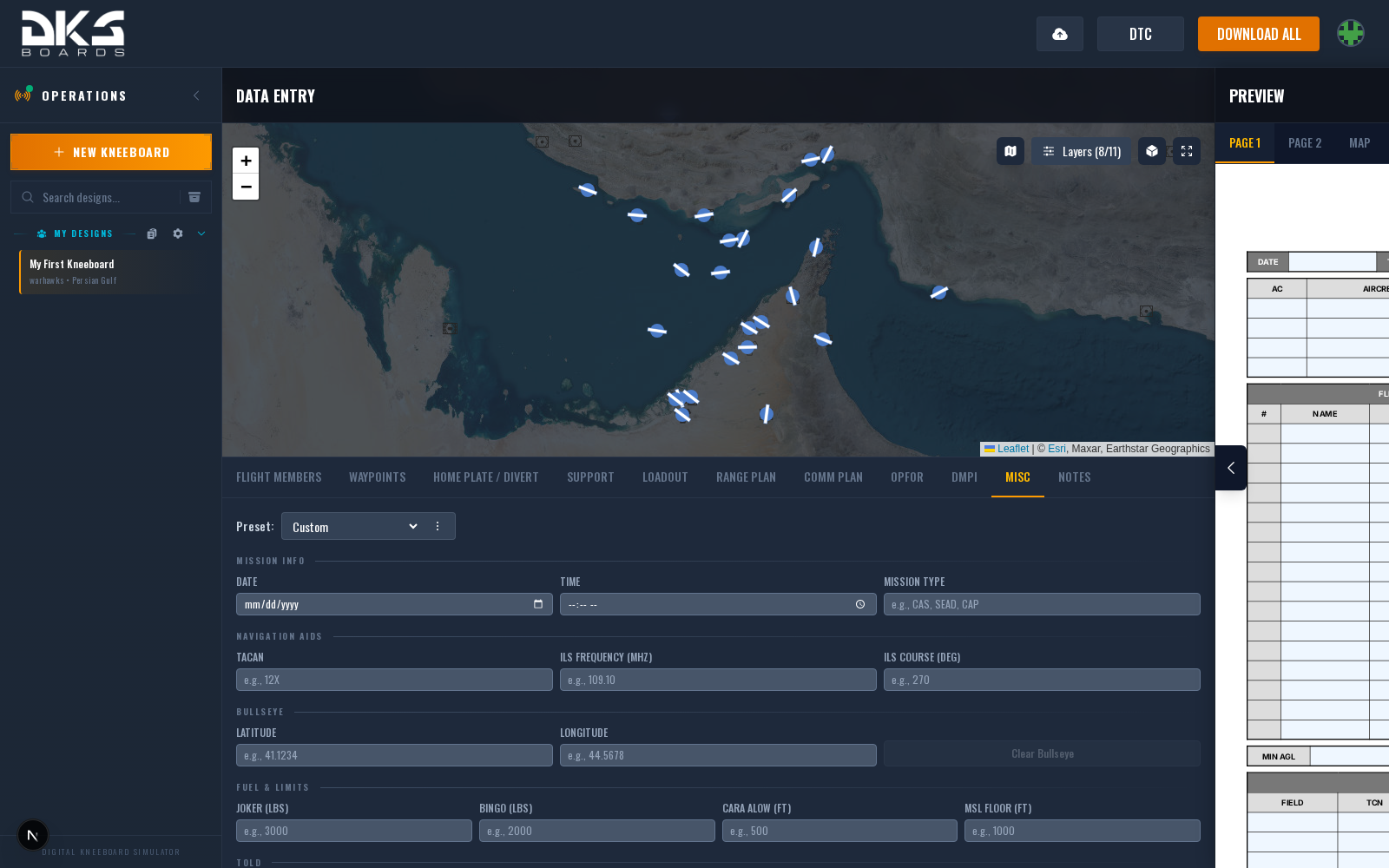
Mission Info
| Field | Description | Example |
|---|---|---|
| Date | Mission date. Inherited from the package master in package flights. | 2024-06-15 |
| Time | Mission time. Inherited from the package master in package flights. | 06:30 |
| Mission Type | Freeform mission type label. | CAS, SEAD, CAP |
| Mission # | Mission number for compact mission header blocks. | 93FS14826 |
Navigation Aids
| Field | Description | Example |
|---|---|---|
| TACAN | Primary TACAN channel for navigation. | 12X |
| ILS Frequency (MHz) | ILS frequency for the primary airfield approach. | 109.10 |
| ILS Course (Deg) | ILS localizer course heading. | 270 |
Bullseye
Set a bullseye reference point by entering latitude and longitude in decimal degrees. The Clear Bullseye button removes the reference point entirely.
Sub-tabs
The tab is split into Mission (mission info, codewords, carrier), Nav & Bullseye, Fuel & TOLD, Weather and Notes (mission notes, watermark). Everything below lives under one of them.
Fuel & Limits
| Field | Description | Example |
|---|---|---|
| Joker (lbs) | Advisory fuel level — time to start thinking about departing the AO. | 3000 |
| Bingo (lbs) | Minimum fuel to begin RTB. Below this, head home. | 2000 |
| CARA ALOW (ft) | Caution altitude / altitude low warning threshold. | 500 |
| MSL Floor (ft) | Minimum MSL altitude for terrain clearance. | 1000 |
| Max MSL (ft) | Altitude ceiling in MSL. Warhawks helicopter kneeboards (AH-64D, OH-58D) display this in place of Min AGL since a max altitude is more tactically useful for rotary-wing operations. | 3000 |
Bingo and Joker give the pilot quick-reference fuel gates without calculating on the fly. On modeled jets they fill in automatically from your squadron's fuel standard when left blank.
Fuel Plan
Shown once an airframe is selected. The floor under Bingo comes from your squadron's fuel standard (Squadron Settings → Standards → Fuel); the greyed value in each box is what the export will use until you type your own.
| Field | Description | Example |
|---|---|---|
| Starting Fuel (%) | Internal fuel at start as a percentage of capacity. External tanks are always full. | 100 |
| Landing Min (lbs) | Fuel you plan to land with. Blank uses the squadron standard for this airframe. | 3000 |
| Passes (T+) | Carrier only: planned passes beyond the first. Each adds the squadron's per-pass fuel to the floor. | 2 |
| Land / Charlie | Time the fuel ladder counts back from, in the kneeboard's clock. Blank uses the last route point's ToT. | 21:45 |
| Ladder Rung (lbs) | Fuel per ladder rung. Blank uses the squadron's max-endurance burn and rung interval. | 1200 |
| Bingo To | The field Bingo is measured to. Set it on the Divert tab (row actions → Bingo to this field); otherwise home plate, then the start point. | Kutaisi |
TOLD
Takeoff and Landing Data fields appear only when the active template includes TOLD elements. For aircraft with weight data (F-16C, F/A-18C, AH-64D, OH-58D, and others), Gross Weight and Rotation speed show an "Auto" placeholder and can be calculated automatically from the loadout.
| Field | Description | Example |
|---|---|---|
| Gross Weight (lbs) | Total aircraft weight. Auto-calculated when aircraft weight data is available. | 42000 |
| Takeoff Fuel (lbs) | Fuel load at takeoff. | 18000 |
| Rotation (KIAS) | Rotation speed. Auto-calculated when aircraft weight data is available. | 145 |
Weather
Structured weather entry with auto-generated METAR output. Fields include:
- Temp, QNH, and Visibility for core conditions
- Ground wind direction and speed, plus turbulence
- Winds aloft at 2,000 ft and 8,000 ft
- Cloud base, density (0--10), and precipitation (None / Rain / Thunderstorm)
The read-only METAR (Auto) field at the top updates as you enter weather data. Use Clear WX to reset all weather fields.
Notes
A freeform text area for additional mission information on the kneeboard. This is separate from the dedicated Notes tab, which provides a full rich-text editor with formatting, images, and markdown support.
Watermark
Set a custom watermark image URL for your kneeboard exports. If left empty, the default watermark is used. This section appears only when the design has been saved.
Package Flight Inheritance
When your design is a flight within a package, the Date, Time, and Mission Type fields are inherited from the package master and cannot be edited directly. Inherited fields are highlighted in blue with a "(Package)" label.