
Flight Members
The Flight Members tab defines who is flying in your flight. Each row represents one crew position -- up to 8 members -- with fields for identification, IFF codes, data links, and helicopter crew assignments.
Columns adapt based on which fields your selected kneeboard template uses. If a field is not referenced by the template, its column is hidden.
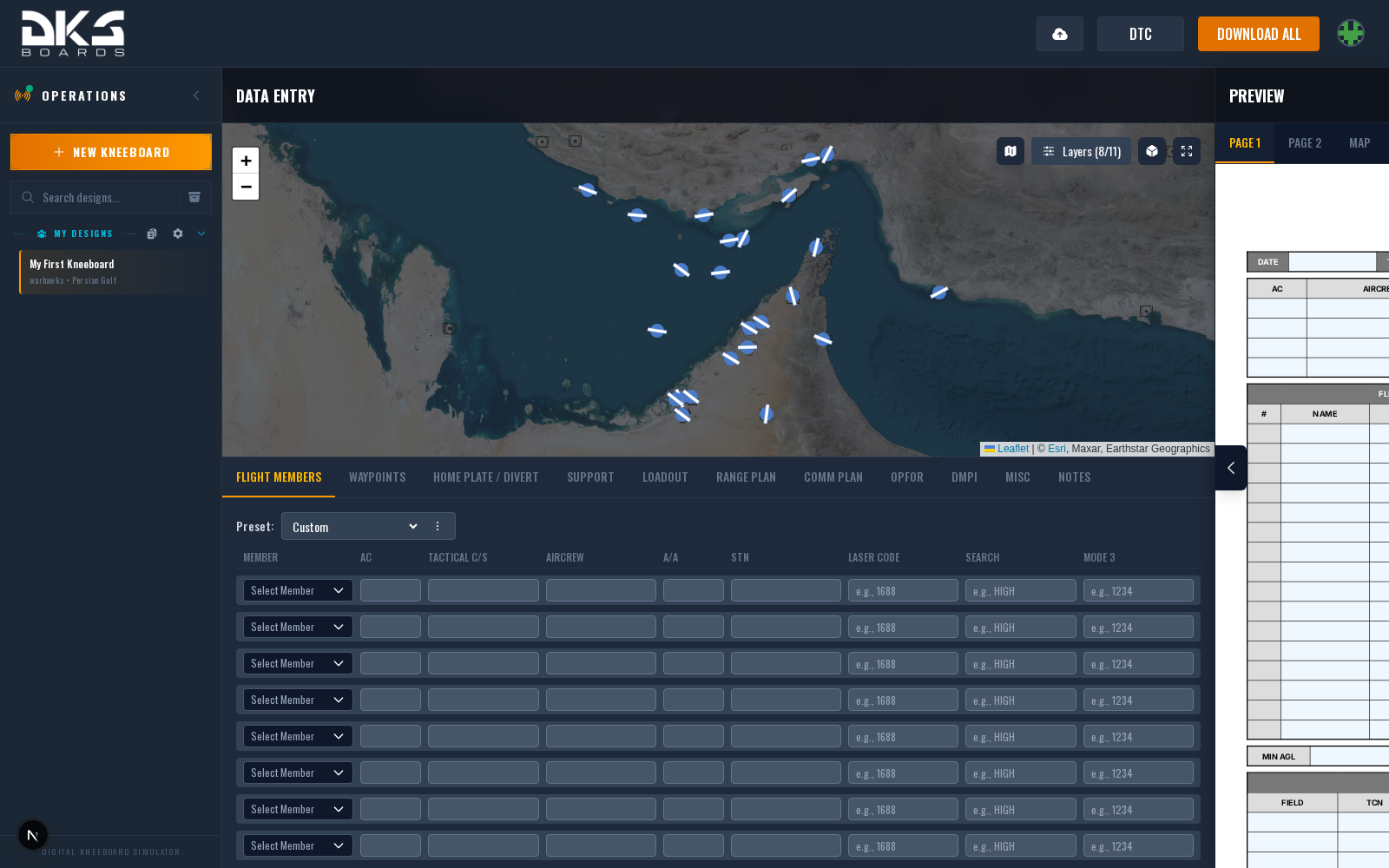
Core Identification
Every flight member has three base fields:
| Field | Description | Example |
|---|---|---|
| AC # | Aircraft number within the flight (position number or tail number). Auto-populated from squadron member profile when a member is selected. | 1 |
| Tactical C/S | Flight callsign used on radio. Used by the DTC export to identify which pilot's kneeboard to generate for F-16C, F/A-18C, AH-64D, and OH-58D. | VIPER 1-1 |
| Aircrew | Pilot's name or personal callsign. Auto-populated from squadron member profile (uses callsign, falls back to name). | Maverick |
IFF and Navigation Codes
Transponder and navigation reference fields:
| Field | Description | Example |
|---|---|---|
| Laser Code | Four-digit laser designator code for guided munitions. Exported to DTC for F-16C, F/A-18C, AH-64D, and OH-58D. Falls back to loadout laser code if not set per-pilot. On the AH-64D the whole 16-slot table, including codes for units outside the flight, lives on the Laser tab. | 1688 |
| Search | Air-to-air radar search assignment (HIGH or LOW). Kneeboard reference only -- not exported to DTC. | HIGH |
| Mode 3 | IFF Mode 3/A transponder squawk code. Kneeboard reference only -- not exported to DTC. | 4521 |
| A/A TACAN | Air-to-air TACAN channel for formation station-keeping. Exported to DTC for F-16C and F/A-18C. Falls back to the TACAN value on the Misc tab if not set per-pilot. | 71Y |
Data Link Fields
Data link fields enable tactical data sharing between aircraft. You will only see the columns that your kneeboard template references:
| Field | Description | Example | Aircraft |
|---|---|---|---|
| STN | Link 16 station number. 5-digit ID identifying your aircraft on the Link 16 network. Exported to DTC for the F-16C as part of the Datalink section. | 12345 | F-16C |
| SADL | Situational Awareness Data Link address for the A-10C's SADL system. Kneeboard reference only. | 01234 | A-10C |
| IDM | Improved Data Modem identifier for digital messaging. Kneeboard reference only. | 3 | OH-58D |
Data link columns only appear when your selected kneeboard template references them. If you don't see a data link column, your template does not use one.
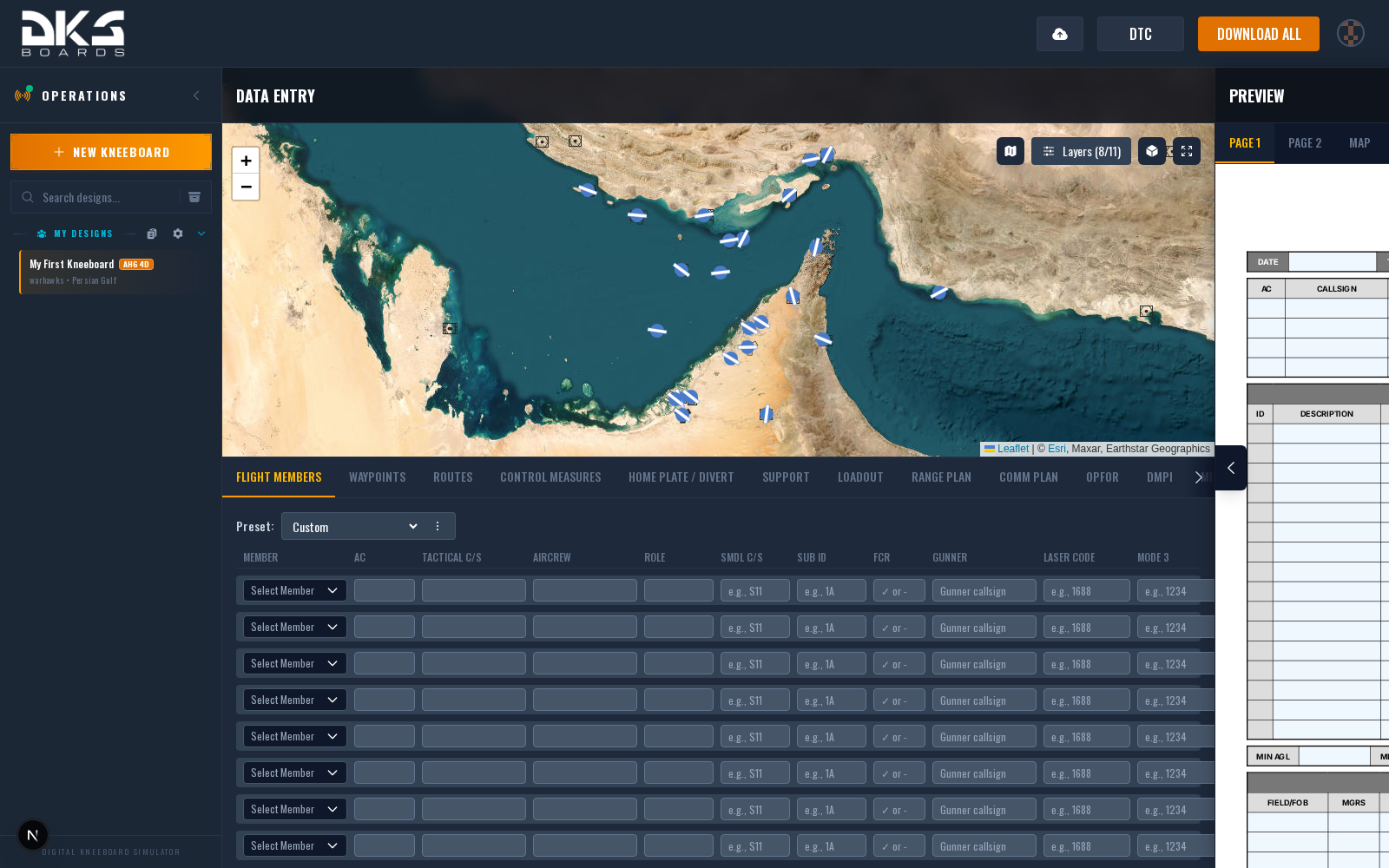
Helicopter Crew Fields
Rotary-wing aircraft have additional fields for multi-crew positions and helicopter-specific networking:
| Field | Description | Example | Aircraft |
|---|---|---|---|
| Role | Crew member's role in the aircraft -- Pilot, Copilot/Gunner (CPG), etc. | Pilot | AH-64D / OH-58D |
| CPLT/Gunner | Name of the Copilot/Gunner (CPG) sharing the aircraft. | Goose | AH-64D |
| CPLT/Observer | Name of the Copilot/Observer sharing the aircraft. | Iceman | OH-58D |
| SMDL C/S | Source Message Data Link network callsign for inter-aircraft digital communication. Kneeboard reference only. | S11 | AH-64D |
| SMDL Sub ID | SMDL sub-identifier distinguishing ownship within the SMDL network. Kneeboard reference only. | 1A | AH-64D |
| FCR | Whether this aircraft has the Fire Control Radar (Longbow). Used for coordinating radar handoffs. | Yes | AH-64D |
Squadron Integration
When your design belongs to a squadron, a member selector dropdown appears at the top of each row. Selecting a squadron member auto-fills:
- AC # from the member's aircraft number.
- Aircrew from the member's callsign (or name if no callsign is set).
Squadron member dropdown selector showing member list with auto-populated AC and Aircrew fields
You can override any auto-filled value by typing directly into the field. The override is saved with your design and does not affect the squadron profile.
If you are not part of a squadron, the member selector does not appear. All fields can still be filled in manually.