
Getting Started
Digital Kneeboard Simulator is a mission planning, briefing, and debriefing platform for DCS World virtual fighter squadrons. Build multi-page kneeboards with flight plans, frequencies, loadouts, and threat data; generate personalized PNG/DTC exports for every pilot in your flight; run step-based briefings with a live whiteboard; and analyze Tacview recordings in full 3D.
Core Workflow
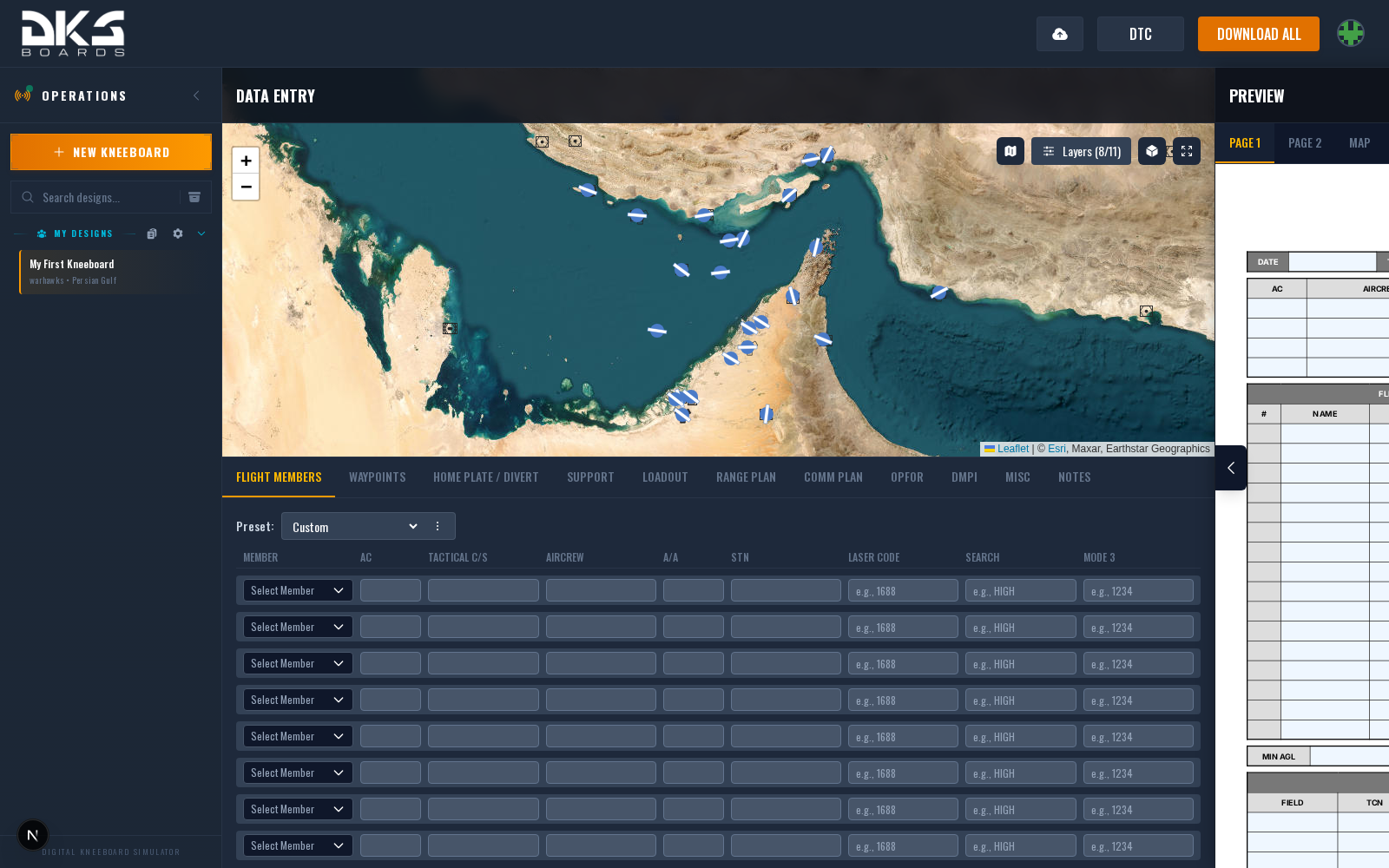
- Create a design — Each kneeboard set starts as a design. Pick the squadron, aircraft, template pack, and theater in the + New Kneeboard dialog. You can change any of these later from the design's Settings. See Designs & Packs.
- Fill in the tabs — The tabbed form below the tactical map lets you enter data across sections: flight members, waypoints, loadout, comm plan, and others. Available tabs depend on your selected aircraft.
- Use the map — The tactical map at the top of the editor handles waypoints, threats, overlays, and drawings. Click, drag, and right-click to edit geometry directly. See Tactical Map.
- Preview live — The preview panel shows your kneeboard pages updating in real time as you type.
- Export — Click DOWNLOAD ALL for a ZIP of personalized PNG kneeboards, or DTC for an in-game data cartridge. See Exporting.
Collaboration
DKS is built around squadrons. When your design belongs to a squadron, you gain:
- Member selector — Pick crew members from the squadron roster to auto-fill callsign, tail number, and other fields.
- Shared agencies — Radio agency library usable across every squadron design. See Comm Plan.
- Theater overlays — Threats, targets, and support assets scoped to a theater, reused across every design. See Theater Overlays.
- Presets — Tab-scoped saved configurations (loadouts, comm plans, divert fields) at squadron or personal scope. See Presets.
- DTC defaults — Aircraft-specific defaults that apply to every member's exports.
- Server integrations — Connect to Fox3 or custom DCS server hosts for Tacview downloads, Realview, and Liveview. See Server Integrations.
For multi-flight operations, packages group several designs under a master with shared-data inheritance — see Package Flights.
Briefing, Debrief, Live
Beyond building kneeboards, DKS includes tools for every phase of a mission:
- Briefings — Step-based mission briefings with an Excalidraw whiteboard and synced map view. Present them in full-screen to your squadron before launch. See Briefings.
- Debrief — Upload DCS Tacview (ACMI) recordings to get 3D replay, BVR analysis, kill attribution, and sortie statistics. See Debrief.
- Realview — Live Tacview Real-Time Telemetry viewer. Watch a running mission with full 3D terrain and entity stats. See Realview.
- Liveview — DCS Olympus integration for live mission observation and commanding (GM / Blue / Red / Observer roles). See Liveview.
Tools
- Drawing Tool — Polygon, line, rectangle, and text annotations on the tactical map. Import from KMZ.
The pages that follow document each data tab and feature area. Some tabs and fields are aircraft-specific and only appear when the selected aircraft supports them.